Each Engage release includes features and fixes to enhance your platform, increase stability, and improve user management. Should you need assistance with a product update, please contact BlueVenn support.
Note: updates to channel properties, e.g. enabling a new, optional property, must be performed by BlueVenn support before they can be used.
| Version | Released | Features and fixes |
|---|---|---|
| 22.6 | November-21 | Campaigns, Channels, Selections, Tools and settings |
| 22.5 | September-30 | Campaigns, Channels |
| 22.4 | September-05 | Campaigns, Channels, Data Management, Maps, Selections |
| 22.3 | July-08 | Campaigns, Channels (Pure360, Adestra, Facebook audience, Google audience), Security, Selections, Tools and settings |
| 22.2 | May-27 | Campaigns, Channels (Acoustic, Adestra, DotDigital, IMI, MailChimp, Tulip) |
| 22.1 | April-12 | Campaigns, Channels (FTP, TextLocal), Data management, Security, Selections |
Engage 22.6
Campaigns
-
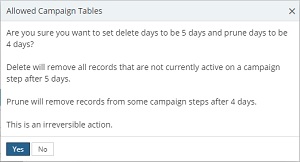
Campaign history prune/delete clarifications - confirmation dialog added when setting deletion days and prune days to clarify the impact of using these features.
-
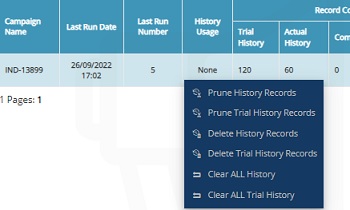
Improved campaign history management - you can now prune, delete or clear campaign history by right-clicking in the campaign usage table and selecting one of the options.
-
Prune history - removes records from a limited number of steps.
-
Delete history - allows you to delete selected runs (active records are retained).
-
Clear history - allows you to erase all runs and records.
-
-
Improvements to campaign attribution to reduce confusion regarding blank data:
-
Campaigns now only display available attribution sets that are at the same table level.
-
Existing campaigns using attribution sets at different table levels now show the following:
-
The Touchpoint named 'AttributionSetTest' uses table 'Address', but the campaign uses table 'Consumer'.
-
The attribution is also unset, and removed upon resaving the campaign.
-
-
Build failures are now logged and surfaced.
-
-
Campaign schedule reports - campaign schedule now includes a prepare row that indicates when Engage starts processing a campaign.
Channels
-
Google offline conversion channel added.
-
IMI - new error reponse codes supported for IMI channels.
Selections
-
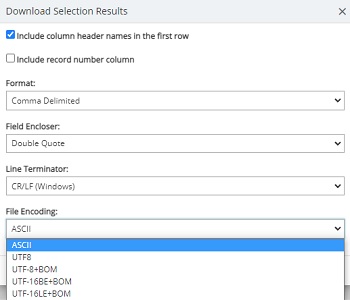
Selection download option added - UTF8+BOM added to encoding options. Unicode options re-labelled to UTF-16 (BE and LE).
-
Selection export options added - encoding for exports updated to match selection download options, i.e. UTF-8, UTF-8+BOM, UTF-16 BE BOM, UTF-16 LE BOM, and ASCII encoding.
Tools and settings
-
Settings for send time optimisation (STO) added to the channel management tab of the tools menu. You can:
-
Turn on/off STO.
-
Specify an integer for the maximum number of responses to include.
-
Specify an integer for the validity period.
-
Specify an integer for the keep completed jobs period (days).
Note: only Sendgrid is supported for STO at present.
-
Engage 22.5
Campaigns
-
Homepage summary - UI change to the schedule planner to improve readability. Gantt chart will show 20 campaigns per page assuming there are at least 20 campaigns whereas it was previously showing 20 scheduled tasks per page.
-
Schedules – campaign scheduling now supports a new schedule type: Monthly - Day Specific, allowing you to select the 1st/2nd/3rd/4th/last Mon/Tues/Wed/Thurs/Fri/Sat/Sun of every X month(s), e.g. 2nd Monday of every month.
-
You can no longer delete a campaign step while there is campaign history associated with the step. The delete icon will be grayed out until you manage the associated history.
Channels
-
IMI Push – mapping rules updated so that new registration events with a different DeviceID → UserID mapping overwrite existing registrations.
-
Salesforce – changes to channel properties allow you to dedupe records by specifying the channel’s external ID as part of the communication step in Engage, rather than it being a channel property.
Note: the external id would need to be one of the fields from the selected field list. The channel will then use that field as the external key for its send to Salesforce.
-
Social channels (Facebook, Google, Instagram) – email address changed from mandatory to optional.
Note: other mandatory fields, e.g. name, still apply.
Engage 22.4
Campaigns
-
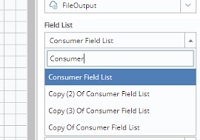
Search function added to field list dropdowns. Dropdown will filter for suggested results.
-
Search function and paging added to voucher code sets.
-
Improved UI rules for bounce nodes on campaigns to allow them to only be displayed when applicable.
Channels
-
Adestra
-
An optional channel property, Data Source Id, has been added for Adestra channel sends.
-
-
Google audience
-
GoogleAds library updated to v10.
-
-
IMI Connect
-
The IMI Push, IMI In App, and IMI Twitter channels have been updated with a configurable send batch size property.
-
-
Instagram offline conversion
-
New Instagram offline conversion channel added.
-
-
Maileon
-
You can now include external seeds on the Maileon channel.
-
-
Pure360
-
A new, optional Specific Send Time (UTC) property is now available. The time is recorded in UTC, i.e. a send time of 09:00 UTC would be 10:00 BST. If left blank, the send time is immediate.
Note: If the time has already elapsed, the delivery will be set up for the next day, e.g. at 18/08/2022 10:00, setting a send time of 09:00 would become 19/08/2022 09:00.
-
-
Tulip
-
You can now include external seeds on the Tulip channel.
-
Data Management
-
Custom DateTime Improvement. Newly supported characters:
-
g - The period or era.
-
K - Time zone information.
The following unsupported characters are caught, with appropriate warning text, but are passed as string literals.
-
z - Offset not supported.
-
' - Literal delimiter not supported.
-
" - Literal delimiter not supported.
-
% - Format character not supported.
-
\ - Escape character not supported.
-
-
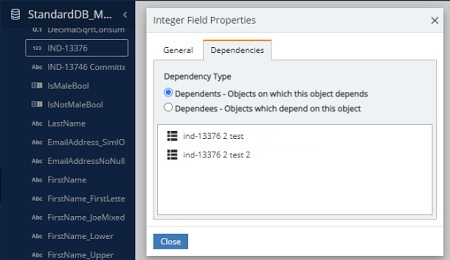
UI update to dependencies tab to remove tree view and display dependencies in a list.
Maps
-
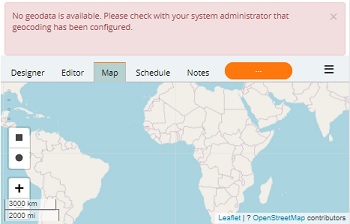
If the postcode field role is not defined on your system, you will now see an explanation why there is no map display when you select the Map tab.
Selections
-
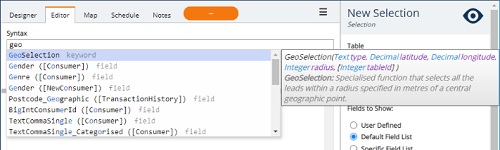
UI improved for ease of reading by increasing size of suggested functions dropdown and tooltip text location on syntax entry fields.
Engage 22.3
Campaigns
-
It is now possible for more tasks to execute concurrently through the Engage scheduler. This allows more campaigns to execute simultaneously.
Note: settings need to be configured for this upgrade to take effect. Contact the Upland BlueVenn support team for assistance.
-
Improved run time and performance of campaign pruning.
Channels
-
Pure360
-
You can now concurrently send and save multiple campaigns via the Pure360 channel.
Note: if you send to a new campaign while one or more campaigns are executing against a specific list in Pure360, Engage will wait until the campaign(s) have completed before sending the new campaign.
-
Security
-
The authorization token expiry time has been increased to 12 hours.
Selections
-
Column header is now updated if an expression is renamed.
Tools and settings
-
Campaign usage table
-
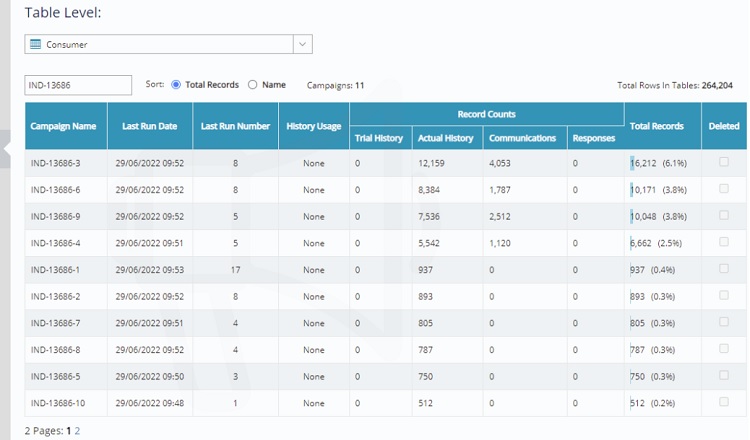
Added paging to campaign usage table to speed up loading of tools page.
-
Added ability to sort by name or total row count and filter by name.
-
Engage 22.2
Campaigns
-
Running scheduled tasks can now be canceled from the schedule tab.
-
Unconnected hard bounce nodes will connect to the same campaign step as the failure node.
Channels
- Channel tunnel response mapping updated to better identify API failures (flagged as failures instead of hard bounces).
Acoustic
-
Channel added to the channel tunnel service.
Adestra
-
Channel added to the channel tunnel service.
Note: field List selection is no longer mandatory for the Adestra channel. However, any fields you want uploaded to the Adestra portal and the contactdata table (other than email address) need to be included in a field list when the channel is run.
DotDigital/DotMailer
-
Channel added to the channel tunnel service.
Note: the DotDigital specified send time is unavailable in the channel tunnel. Depending on the use case, the wait step of a campaign can be used to duplicate the functionality of the specific send time.
IMI
- Channel now includes an app ID channel property to support clients with multiple app within the IMI Connect platform.
MailChimp
- Channel added to the channel tunnel service.
Tulip
-
Responses collection job added to the Tulip channel. Once configured, this job will run a ReturnResponses task to pull responses from the Channel Tunnel into Engage.
Engage 22.1
Campaigns
-
You can now duplicate a single selected campaign step using a new button in the hamburger menu. The new step is prefixed with "Copy of" and has an incremented step id, e.g. copying a step named Send Email will create a new step called Copy of Send Email.
Note: campaign cascades cannot be duplicated as the step is a combination of steps that need to be defined individually.
-
Scheduled blackouts can now be set to recur annually or be one-time events, e.g. setting a blackout period for the 1-Mar-2022 and selecting for it to recur will also result in blackout periods on 1-Mar-2023, 1-Mar-2024, etc.
Channels
FTP
-
Updates to the channel configuration allow you to remove the original version of a file from a campaign when the channel appends and zips new data (existing configurations will need updating for this option to be activated).
TextLocal
-
short link functionality can be turned on/off (previously always on).
Data management
-
UK postcode geo data updated.
Security
-
Streamlined user sign in page.
-
Security permissions and settings for the creation of custom codes by administrators and power users.
-
Note: the button to add custom codes is only available to users with the correct security settings (previously, the button was visible to all users even if they were not able to add custom codes).
Selections
-
You can now duplicate a single selected selection step using a new button in the hamburger menu. The new step is prefixed with "Copy of" and has an incremented step id, e.g. copying a step named Do not Email will create a new step called Copy of Do not Email.
Note: selection result steps cannot be duplicated as only one result step permitted.